Claude agents: Claude Code, the Agent SDK, Managed Agents and MCP explained
The ways to build AI agents with Anthropic's Claude in 2026: the API with tool use, the Claude Agent SDK, Managed Agents and Claude Code, how MCP and Skills fit in, and how to choose.
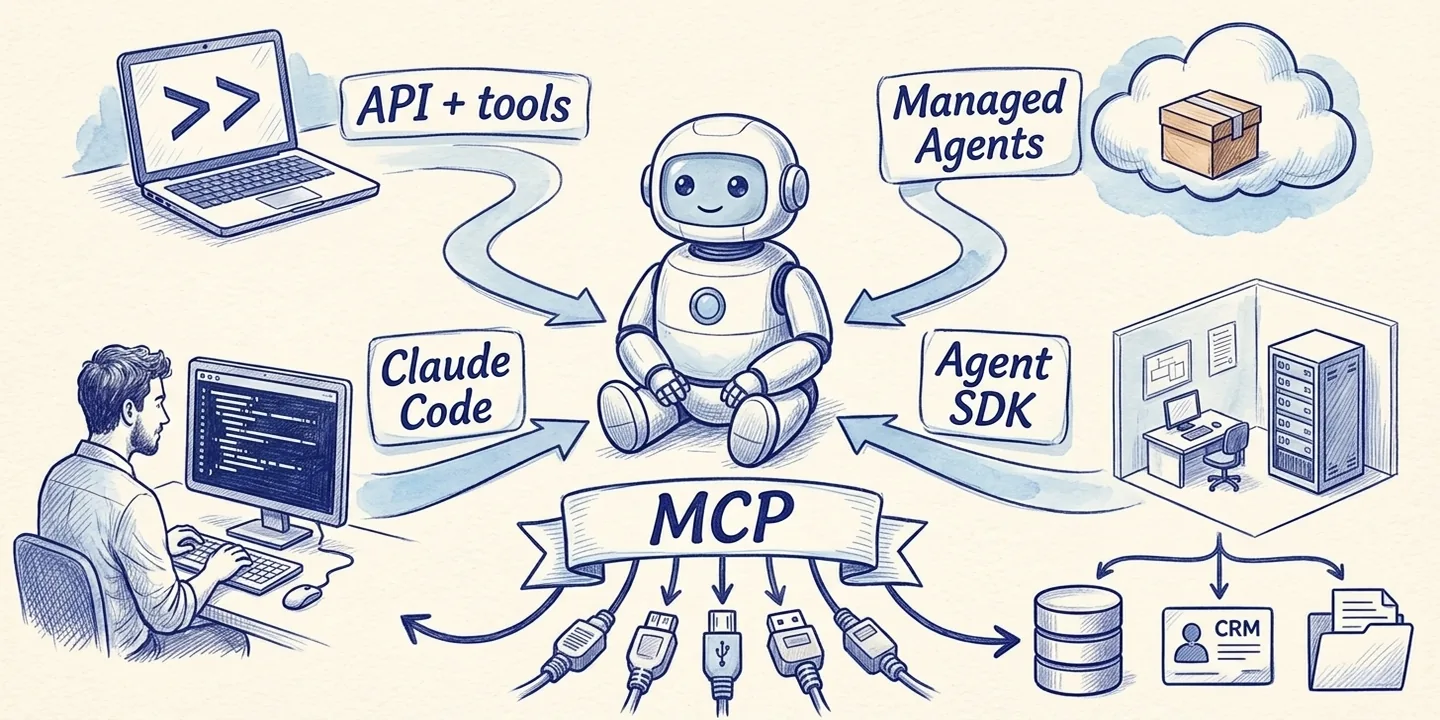
Claude, Anthropic’s family of models, is widely used for agents: systems that plan, call tools and work through a task step by step. Anthropic offers several ways to build them, and they differ mainly in two things: who runs the agent loop and who hosts the place where the agent’s tools run.
This article maps the options as of November 2026, explains where the Model Context Protocol (MCP) and Skills fit, and gives a simple way to choose. Product details change quickly, so check the official documentation before you commit to a design.
The four ways to build a Claude agent
| Option | You write | Who runs the loop | Where tools run | Best for |
|---|---|---|---|---|
| Claude API with tool use | The loop and every tool | You | Your servers | Full control, custom flows |
| Claude Agent SDK | A prompt, options and custom tools | The SDK, on your servers | Your servers | Coding and file-based agents you host |
| Managed Agents | Agent configuration and your tools | Anthropic | An Anthropic-hosted sandbox per session | Hosted agents, long or scheduled runs |
| Claude Code | Instructions and settings | Claude Code | Your machine or a cloud session | Developers working on code |
1. The Claude API with tool use
This is the foundation. You describe your tools (name, description and an input schema), send them with the request, and Claude replies either with an answer or with a request to call a tool. Your code runs the tool, sends back the result and repeats until Claude is done.
You can write this loop yourself, or let the SDK’s tool runner handle the repetition while you only write the tool functions. Either way, you decide exactly what happens at each step: approvals, retries, logging, limits.
Choose it when you want an agent inside your own product, with your own rules and no extra dependency, or when the flow is unusual enough that a ready-made harness gets in the way.
2. The Claude Agent SDK
The Agent SDK is the engine behind Claude Code, packaged as a library for Python and TypeScript. It comes with built-in tools for reading and editing files, running shell commands, searching and fetching the web, plus context management, permissions, hooks, subagents and sessions. You give it a task and options; it runs the full loop.
You host it, so it runs next to your code and data. That makes it a good fit for agents that work on repositories, documents or files on your own infrastructure.
Choose it when you want a capable, batteries-included agent that works with files and commands, and you are happy to run it on your own servers.
3. Managed Agents
With Managed Agents, Anthropic runs the agent loop and gives each session its own sandboxed container where the agent can run commands, write files and execute code. You define the agent once (model, instructions, tools) as a versioned configuration, then start sessions that use it and stream their events.
At the time of writing it is in beta and includes features such as scheduled runs, credential vaults that keep secrets out of the sandbox, permission policies for tool calls and multi-agent workflows. It bills session runtime on top of model usage and keeps session history until you delete it, which matters for data policies.
Choose it when you want an agent without hosting the loop or the sandbox yourself: long-running tasks, scheduled jobs or many parallel sessions.
4. Claude Code
Claude Code is Anthropic’s agent for software development, available in the terminal, in editors, on desktop and on the web. It reads a codebase, edits files, runs tests and commands, and works through multi-step changes with the developer reviewing the result.
It is not a framework for your customers’ agents, but it is the most direct way to see what a well-built agent can do, and many teams use it daily for development work.
Choose it when the job is building or maintaining software.
Where MCP fits
The Model Context Protocol is an open standard, introduced by Anthropic, for connecting AI applications to tools and data. An MCP server exposes tools (and other resources) in a standard way; any MCP-compatible client can use them.
In practice, MCP means you build a connector once, for example to your CRM or your document store, and use it from Claude Code, from an Agent SDK agent, from Managed Agents or from other MCP-aware tools. It also gives you one place to apply permissions and logging. See MCP vs code execution and the context window for when MCP is the right pattern.
Where Skills fit
Skills are folders of instructions, scripts and resources that an agent loads only when a task needs them: for example, how to produce a report in your company’s format or how to work with a specific file type. They keep the agent’s main instructions short and let you reuse know-how across agents.
Choosing a model
Claude comes in tiers: larger models for the hardest reasoning and long, complex tasks, and smaller, faster, cheaper ones for high-volume or simple steps. Many agents use the larger model for planning and judgement and a smaller one for repetitive sub-tasks, such as reading and summarising many documents. Test with your own examples: the right choice is the cheapest model that completes your tasks correctly, measured per completed task, not per request.
A practical way to decide
- Is it software development? Start with Claude Code.
- Do you want Anthropic to host the agent and its sandbox? Use Managed Agents.
- Do you want a full-featured agent running on your own servers? Use the Agent SDK.
- Do you need an agent inside your product with a custom flow? Use the API with tool use.
- Do several of these need the same systems? Put those systems behind MCP servers.
Whatever you choose, the same rules apply as for any agent: narrow tools, least privilege, approval for irreversible actions, budgets and readable logs. See autonomous AI agents for how to set the right level of freedom.
Data and security considerations
- Where data goes. With the API and the Agent SDK, your code controls what is sent to the model. With Managed Agents, session data and history are stored by Anthropic until deleted. Check retention options against your policies.
- Secrets. Keep API keys and passwords out of prompts and files the agent can read. Use credential mechanisms designed for agents, or keep sensitive calls in tools on your side.
- Prompt injection. Anything the agent reads can contain hostile instructions. Treat it as data and limit what tools can do. See AI system security: prompt injection and permissions.
- EU deployments. Check data residency, your data processing agreement and the GDPR position for personal data before going to production.
Example: one task, three implementations
Imagine a task: every morning, check yesterday’s support tickets, group them by topic, flag anything that looks like a product defect and post a short report to the team channel.
- With the API and tool use, you write a small service with three tools:
list_tickets,get_ticketandpost_report. Your code runs the loop, applies a limit on how many tickets are read and logs each step. A scheduler on your side starts it every morning. Most control, most code to maintain. - With the Agent SDK, you run the agent on your server with access to an export of the tickets as files, and give it one custom tool to post the report. It can read, search and summarise the files with its built-in tools. Less code, and still everything runs on your infrastructure.
- With Managed Agents, you define the agent once, give it access to the ticket system through an MCP server or a custom tool, and set up a scheduled run. Anthropic hosts the loop and the sandbox; you mainly maintain the configuration and the connector. Least infrastructure, with session data stored on Anthropic’s side.
The instructions to the agent, the definition of “defect” and the report format are the same in all three. That is the real work, and it carries over if you change the approach later.
Frequently asked questions
Is the Agent SDK the same as the API’s tool runner?
No. The tool runner is a helper in the regular API SDK that loops over tools you define. The Agent SDK is the full Claude Code engine with built-in file, shell and web tools.
Can I use Claude agents with my existing systems?
Yes, through tools you define or through MCP servers. Many common business systems already have MCP connectors, and custom ones are straightforward to build.
Can a Claude agent run on my own servers?
The agent loop can, with the API or the Agent SDK. The model itself runs on Anthropic’s infrastructure or through cloud providers that offer Claude. If the model must run on your hardware, you need an open-weight model; see AI agents on-prem and on a VPS.
How do I control costs?
Set step and spend limits per task, use a smaller model for simple sub-tasks, cache repeated context and measure the cost per completed task.
What to bring to a first conversation
Bring the task, the systems the agent must reach, where the data is allowed to go and who approves what. From there we can pick between the API, the Agent SDK and Managed Agents, and decide which connectors to build as MCP servers. For an overview of the market, see top AI agents in 2026.