MCP Tool Calls vs. Code Execution: What Fills Your Context
How MCP tool definitions and tool results consume the context window, when tool search is enough, and when to move agents to code execution in a sandbox.
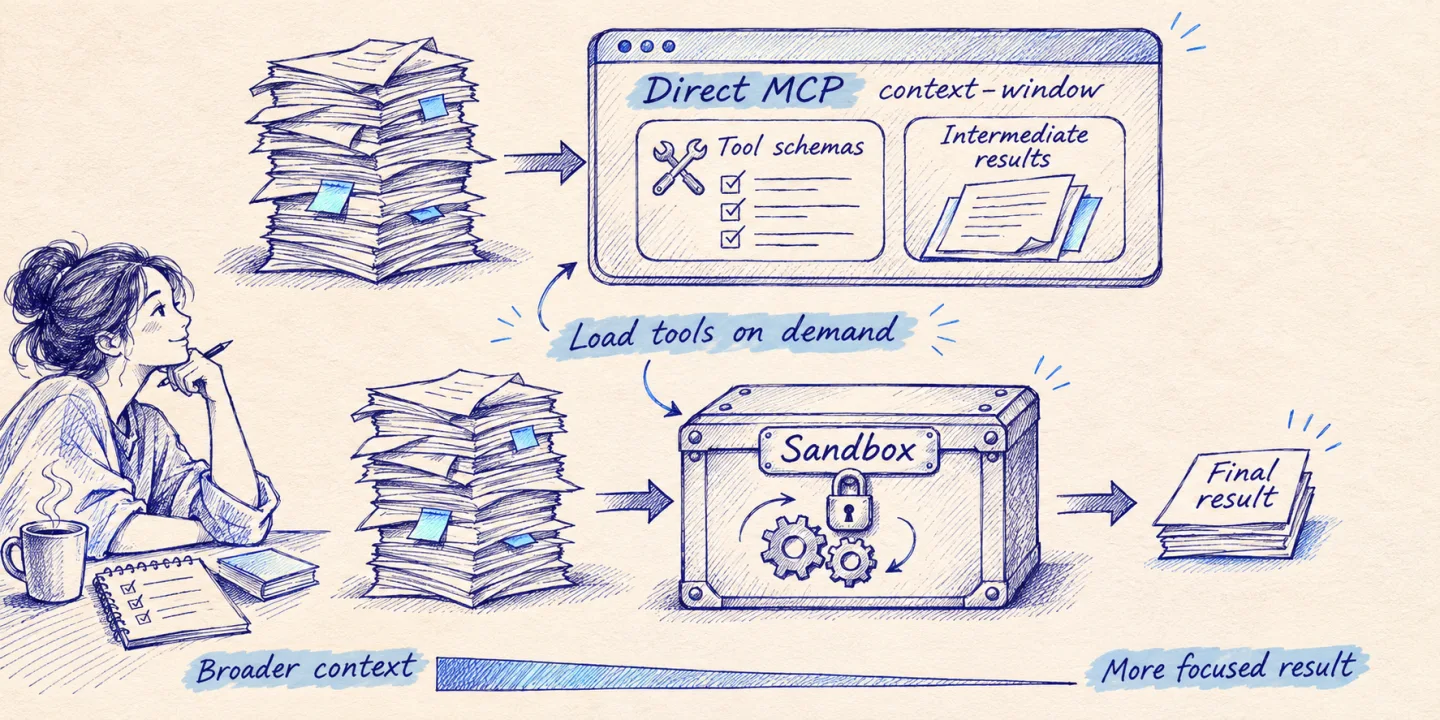
Every MCP server you connect to an agent costs context twice: once for the tool definitions that are loaded before the user has typed anything, and again for every tool result that travels through the model on its way to the next call. Direct tool calling is fine while both stay small. When definitions reach tens of thousands of tokens, or results reach thousands of rows, the fix is to stop routing everything through the model: load definitions on demand, and let the agent write code that calls the tools inside a sandbox and returns only what it needs. This article explains what each approach does to the context window, what code execution costs in operations, and how I choose between them.
Key takeaways
- Direct MCP tool calling spends context on two things: definitions loaded upfront and intermediate results that the model only relays.
- Tool search with deferred loading fixes the first problem. It does nothing for the second.
- Code execution (Anthropic’s programmatic tool calling, Cloudflare’s Code Mode, or your own sandbox) fixes the second by keeping intermediate data out of the model.
- Code execution is not free. You take on a sandbox, a tighter security review, container lifecycle and harder debugging.
- Under roughly ten tools with small responses, plain tool calls are still the right choice.
Where the context goes with direct tool calls
Tool definitions
In MCP, a client discovers tools with tools/list. Each tool comes back with a name, a description and a JSON Schema for its input, plus an optional output schema. The host application then places those definitions in the model’s context so the model can choose between them. That is the whole mechanism, and it works well with a handful of tools.
It scales badly. Anthropic’s engineering team published a concrete breakdown: five servers (GitHub, Slack, Sentry, Grafana, Splunk) with 58 tools came to about 55K tokens of definitions before the conversation started. Jira alone adds about 17K, a few more servers of that size take the overhead towards 100K, and they report having seen 134K tokens of definitions in one setup before optimisation. The same team’s API documentation adds a second effect: tool selection accuracy degrades once more than 30 to 50 tools are available at once. So a large toolset costs you both room and accuracy.
Intermediate results
The second cost is less visible. In an agent loop, each tool result is appended to the conversation, and the whole conversation is sent again on the next model turn. If the agent fetches a document from one system in order to write it into another, the document enters the context as a tool result, and then the model has to reproduce it as the argument of the next call.
Anthropic’s post on code execution with MCP uses a meeting transcript moved from Google Drive to Salesforce as its example, and estimates that a two-hour sales meeting adds around 50,000 tokens because the text passes through the model twice. The model contributes nothing to that data. It is acting as an expensive copy buffer, and long copies are exactly where models drop or alter content.
Why prompt caching does not solve this
Prompt caching reduces what you pay for a repeated prefix. In Anthropic’s pricing, cache reads are billed at a fraction of the base input price (0.1x or less, depending on the model). The current MCP specification (revision 2026-07-28) helps here: servers should return tools in a deterministic order so that the prefix stays stable and cacheable. But cached tokens still occupy the window. Caching is a cost fix, not a capacity fix, and it does nothing for results that change on every call.
Three mechanisms that move work out of the window
| Mechanism | What it removes from context | Where the work runs | What you operate |
|---|---|---|---|
| Tool search with deferred loading | Unused tool definitions | Model provider or your client | A good tool catalog (names, descriptions) |
| Programmatic tool calling | Intermediate tool results, extra model turns | Provider-managed code container | Tool handlers that answer calls from code |
| Code execution with MCP / Code Mode | Both of the above | Your sandbox or an isolate platform | Sandbox, generated bindings, monitoring |
Tool search and deferred loading
The idea is simple: send the model a search tool instead of the full catalog. On the Claude API, you mark tools with defer_loading: true and include one of the tool search tools (a regex variant and a BM25 variant exist). The model searches by name, description and argument names, gets back up to five matching tools by default, and only those definitions are expanded into context. The documentation lists the feature as stable, allows up to 10,000 deferred tools per request, and recommends keeping the three to five most-used tools non-deferred.
Anthropic’s reported figures: around 8.7K tokens of context used with tool search against roughly 77K with everything loaded, and on their MCP evaluations accuracy rose from 49% to 74% on Opus 4 and from 79.5% to 88.1% on Opus 4.5. In the Claude Agent SDK, tool search is now on by default. The cost is one extra round trip whenever the model has to search, which is why the same docs say that below about ten tools, loading everything upfront is typically faster.
Programmatic tool calling
Programmatic tool calling addresses results rather than definitions. You add the code execution tool and mark each tool that code may call with allowed_callers. The model then writes a Python script that calls your tools as functions. Each call pauses the script, your application returns the result to the running code, and only the script’s final output is added to the model’s context.
[
  { "type": "tool_search_tool_bm25_20251119", "name": "tool_search_tool_bm25" },
  { "type": "code_execution_20260120", "name": "code_execution" },
  {
    "name": "list_overdue_invoices",
    "description": "List unpaid invoices past their due date. Returns JSON rows: invoice_id, account_id, amount_eur, days_overdue.",
    "input_schema": {
      "type": "object",
      "properties": { "min_days_overdue": { "type": "integer", "minimum": 1 } },
      "required": ["min_days_overdue"]
    },
    "defer_loading": true,
    "allowed_callers": ["code_execution_20260120"]
  }
]
The numbers Anthropic publishes are more modest than the headlines, and I find that reassuring. On a 75-tool project-management benchmark, billed input tokens dropped by roughly 38% with no change in accuracy. On τ²-bench, where each turn makes one or two sequential calls, scores were unchanged and cost went up by about 8%. Fan-out and filtering workloads benefit. Strictly sequential ones do not.
Two details matter when you plan an architecture around this. Tools provided through Anthropic’s MCP connector cannot be called programmatically, so “code execution with MCP” on that API means your own tools, which may proxy MCP servers behind your application. And the feature is not eligible for zero data retention, because container data is kept for up to 30 days.
Code execution with MCP, or “Code Mode”
The general pattern goes further: present MCP servers to the agent as a code API and give it a sandbox.
Anthropic’s version generates a file tree, one directory per server and one file per tool, where each file is a typed wrapper around the MCP call. The agent lists the directory, reads only the files it needs, and writes a script. Their headline example goes from 150,000 tokens to 2,000, a 98.7% reduction. Because data stays in the execution environment, the harness can also tokenise personal data before the model sees anything and restore it only when it flows into the next tool call.
Cloudflare reached the same conclusion from a different direction. Their Code Mode converts an MCP server’s schema into a TypeScript API and exposes a single tool that executes code in a V8 isolate. The sandbox has no general network access; it can only reach the connected servers through bindings, and credentials are attached outside the sandbox so generated code never handles them. Their argument is that models have seen far more real code than tool-call syntax. The original 2025 post gave no benchmark figures and noted that the entire generated API was still loaded into context.
By February 2026 Cloudflare had closed that gap for its own API: an MCP server covering more than 2,500 endpoints with just two tools, search() and execute(), at around 1,000 tokens. They put a conventional MCP equivalent at 1.17 million tokens. The OpenAPI spec never enters the context; the agent queries it with code.
A worked example with token arithmetic
Take an agent connected to the five-server setup from Anthropic’s breakdown (about 55K tokens of definitions). The task: find overdue invoices for enterprise accounts and post a summary to Slack. Everything below except the 55K figure is illustrative: a 1,000-token system prompt and request, an invoice query returning 30,000 tokens of rows, a CRM lookup returning 12,000, a Slack confirmation of 500, about 3,000 tokens for the three tool definitions found by search, 500 for the search tool itself, and a 400-token script that prints a 600-token summary. Output tokens and call overhead are ignored.
An agent loop re-sends the conversation on every turn, so what you pay for is the sum of all turns, not the final size.
| Approach | Model turns | Input tokens per turn | Total input processed | Peak context |
|---|---|---|---|---|
| Direct MCP, all definitions loaded | 4 | 56,000 → 86,000 → 98,000 → 98,500 | 338,500 | 98,500 |
| Tool search, direct calls | 5 | 1,500 → 4,500 → 34,500 → 46,500 → 47,000 | 134,000 | 47,000 |
| Tool search + code execution | 3 | 1,500 → 4,500 → 5,500 | 11,500 | 5,500 |
Three things are worth reading from this. Tool search alone removes the fixed overhead but leaves the 42,000 tokens of rows in the conversation, where they are re-read on every later turn. Code execution keeps those rows in the sandbox, so the model sees one script and one summary. And the saving comes almost entirely from the size of the intermediate data: shrink the invoice result to 500 tokens and the third row barely improves on the second, while you would still be paying for a container.
In code, the third approach is one short script written by the model:
invoices = json.loads(await list_overdue_invoices({"min_days_overdue": 30}))
accounts = json.loads(await get_accounts({"ids": sorted({i["account_id"] for i in invoices})}))
tier = {a["id"]: a["tier"] for a in accounts}

overdue = [i for i in invoices if tier.get(i["account_id"]) == "enterprise"]
total = sum(i["amount_eur"] for i in overdue)
summary = f"{len(overdue)} enterprise invoices overdue 30+ days, EUR {total:,.2f} outstanding"

await post_slack_message({"channel": "#finance", "text": summary})
print(summary)
What code execution costs you
A sandbox you can trust. Model-written code must run somewhere isolated, with CPU, memory and time limits and no default network egress. Anthropic’s own post says this adds operational overhead and security considerations that direct calls avoid. Your options are a provider-managed container, an isolate platform, or your own. The last is the most work.
A wider injection surface. Tool results now arrive inside a running program as strings. If any part of the pipeline interprets them as code, data from an external system can become instructions. Parse results as data, validate them, and never give the sandbox credentials. I cover the API side of this in designing agent-ready APIs.
State and lifecycle. Containers start, pause and expire. A tool handler that takes too long will time out inside the model’s script (Anthropic documents about four minutes for a pending call). Long operations need their own job pattern.
Harder debugging. A failed direct call is one request and one response in a trace. A failed script is a stack trace from generated code that called five tools in a loop. Log every tool call with its caller, keep the script text, and make scripts reproducible outside production.
Lost per-call approval. With direct calls, the host can ask a human before each side effect. A script that performs ten writes needs approval designed in another way, for example read-only tools callable from code and write tools restricted to direct calls.
Decision framework
| Situation | Use |
|---|---|
| Fewer than ~10 tools, small responses, each step needs model judgement | Direct MCP tool calls |
| Many servers or 10K+ tokens of definitions, but small results | Tool search with deferred loading |
| Fan-out over many items, large results to filter or aggregate, data moved between systems | Tool search + code execution |
| Sensitive data that should not reach the model | Code execution with tokenisation in the harness |
| Side effects that need human approval per action | Direct calls for the write tools, even inside a code-first design |
| Zero data retention required | Self-managed sandbox, or direct calls with tight result shaping |
My default order is: shape the tools first (fewer, task-level tools with bounded responses), then add tool search, then add code execution only for the workloads that need it. Measure billed input tokens per completed task before and after each step, on your own traffic. If you are building a customer-facing assistant, the same budget thinking applies to conversation history; I go through that in the AI bot architecture article.
How I work on this with clients
Most teams I talk to do not have a context problem yet. They have 40 thin tools generated from an OpenAPI file and a model that picks the wrong one. So I start with a trace review: which tools are called, how large the results are, how many turns a task takes, where the tokens go. From there the work is usually redesigning the tool surface, adding deferred loading, and introducing a sandbox only where the arithmetic justifies it.
Custom MCP servers and API integrations are part of the AI solutions I deliver, built on modules I have already tested rather than from a blank repository. If you want a second opinion on your agent architecture or its token bill, book a technical call and bring a trace.
Sources
- Code execution with MCP: building more efficient AI agents (Anthropic Engineering)
- Introducing advanced tool use on the Claude Developer Platform (Anthropic Engineering)
- Tool search tool (Claude API documentation)
- Programmatic tool calling (Claude API documentation)
- MCP connector (Claude API documentation)
- Prompt caching (Claude API documentation)
- Scale to many tools with tool search (Claude Agent SDK documentation)
- Code Mode: the better way to use MCP (Cloudflare Blog)
- Code Mode: give agents an entire API in 1,000 tokens (Cloudflare Blog)
- Model Context Protocol specification, revision 2026-07-28: Tools
- Model Context Protocol specification, revision 2026-07-28: Key changes