AI Bot Architecture: From Scripted Chatbot to Agent
Architecture of an omnichannel AI assistant that checks orders, books appointments and hands off to people: channels, tools, guardrails, cost and rollout.
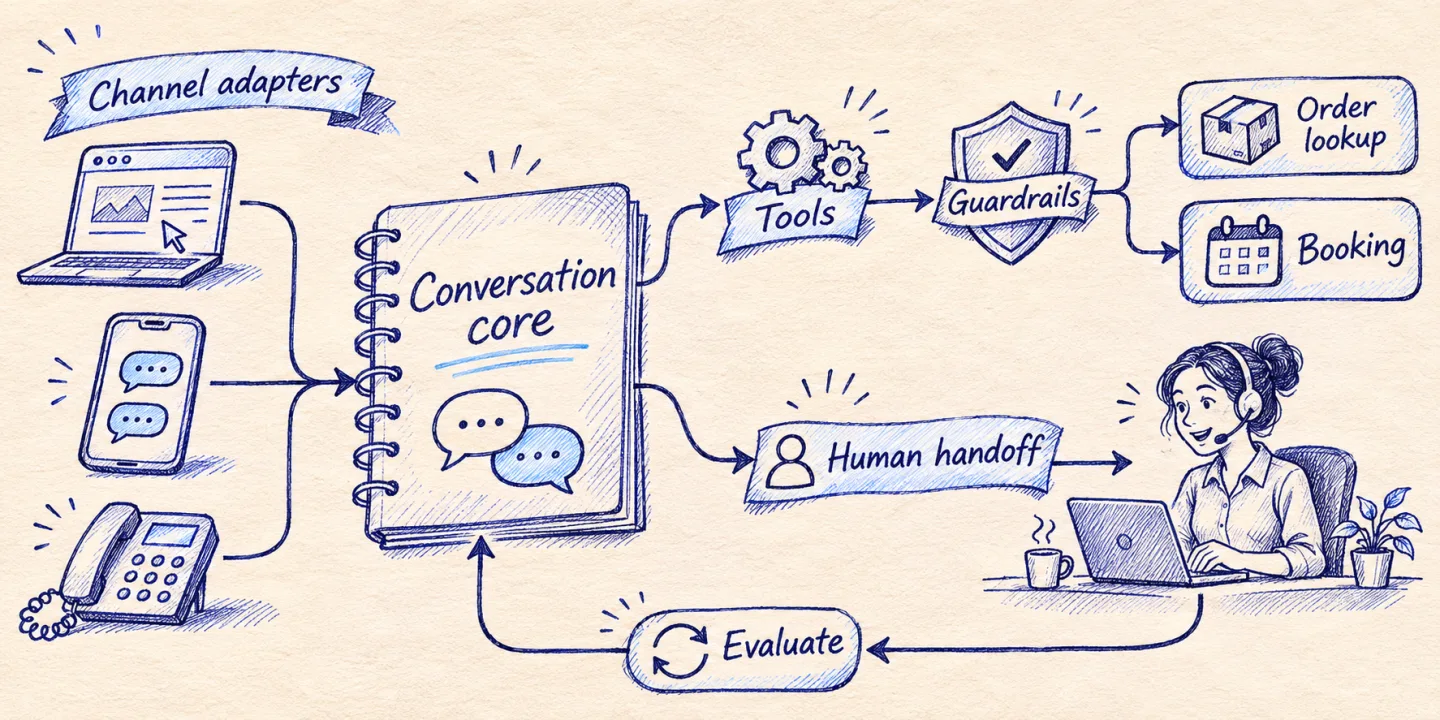
A customer-facing assistant is worth building when it can finish a task: tell the customer where the parcel is, move the appointment, say whether the blue one is in stock in size M. A bot that only talks sends the customer to a human anyway, with one more step in between. The architecture that gets you from talking to doing has five parts: channel adapters, a conversation core, a tool layer on top of your business systems, guardrails, and a handoff path to a person. This article walks through each one, then covers cost and a rollout plan that limits the damage a new bot can do.
Key takeaways
- There are three generations of bot: scripted, document-answering (RAG) and tool-using. Each needs more from your systems than the previous one.
- Build one conversation core and plug channels into it. Do not build a bot per channel.
- The tool layer decides what the bot can actually do. If your shop or calendar has no API, start there.
- Human handoff with a summary is the most important feature, not a fallback.
- Measure resolved conversations, not deflected ones.
Three kinds of bot
| Scripted bot | RAG bot | Tool-using agent | |
|---|---|---|---|
| How it answers | Decision tree with buttons | Finds passages in your documents and answers from them | Calls your systems, then answers |
| Good for | Opening hours, simple routing | Policies, product information, how-to questions | Order status, bookings, changes, stock |
| Needs from you | A list of questions | Clean, current documents | APIs, permissions, approval rules |
| Typical failure | “I didn’t understand, choose an option” | Confident answer from an outdated document | Wrong action taken on real data |
| Risk level | Low | Medium | Highest, so it needs the most control |
Most businesses need a mix: retrieval for the “what is your return policy” questions and tools for the “where is my order” ones. The retrieval side is the same pipeline I describe in the private RAG reference architecture. This article concentrates on the rest.
The architecture
 Web widget     WhatsApp Business      Email
     |                 |                 |
     v                 v                 v
+------------------------------------------------+
|              Channel adapters                  |
|  normalise messages, identity, attachments     |
+------------------------+-----------------------+
                         |
                         v
+------------------------------------------------+
|             Conversation core                  |
|  session state  ->  model  ->  policy checks   |
+-------+---------------+----------------+-------+
        |               |                |
        v               v                v
  +-----------+   +------------+   +-----------+
  | Retrieval |   | Tool layer |   |  Handoff  |
  | (RAG)     |   | shop, CRM, |   |  queue +  |
  |           |   | calendar   |   |  summary  |
  +-----------+   +------------+   +-----------+
        |               |                |
        +-------+-------+----------------+
                v
        Logs, evaluation, cost tracking
Channel adapters
Each channel has its own message format, identity model and rules. The web widget knows a session cookie; WhatsApp knows a phone number; email knows an address and a thread. The adapter’s job is to turn all of that into one internal message shape (who, which conversation, text, attachments) and to turn the core’s reply back into what the channel accepts.
Two things belong in the adapter and nowhere else. First, channel rules: for example, WhatsApp Business restricts free-form replies outside the customer service window that follows the customer’s last message, and requires pre-approved templates after that. Second, formatting: buttons, lists and links render differently everywhere. Keep both out of the prompt.
Conversation core
The core owns the loop: load the session, build the prompt, call the model, run any tools the model asks for, check the reply against policy, send it. It is channel-agnostic, so a conversation that starts on the website can continue on WhatsApp if the customer is identified on both.
State is split in two. Short-term state is the current conversation, trimmed or summarised when it grows. Long-term state is not something the model remembers; it is what your CRM already knows about the customer, fetched through a tool when needed. Treating the CRM as the memory keeps one source of truth and makes data-deletion requests manageable.
Tool layer
This is where the bot becomes useful and where it becomes dangerous. Typical tools for a shop:
get_order_status(order_number, email): read-only, verifies the email matches the order.find_products(query, in_stock_only): searches the live catalog, returns at most five items.create_return_request(order_number, items, reason): writes, runs with a preview first.book_appointment(service, slot)andreschedule_appointment(booking_id, slot)for a clinic or a salon.
The design rules are the ones from agent-ready APIs: task-shaped tools, small responses, idempotency on writes, a dry-run preview before anything irreversible. One more rule is specific to customer-facing bots: the tool verifies identity, not the model. If the customer has not proven they own the order (matching email, a code sent by SMS, a logged-in session), the tool returns nothing, regardless of how persuasive the conversation is.
Guardrails
Guardrails are ordinary code that runs before and after the model.
- Scope. The assistant answers about your business. Questions outside it get a short, polite redirect.
- No invented commitments. Prices, delivery dates, discounts and policies come from tools or documents. If the source is missing, the bot says it does not know and offers a person. A post-check can block replies that contain a price or a date that did not come from a tool result.
- Regulated advice. A clinic’s bot books appointments; it does not interpret symptoms. A law firm’s bot collects the facts of a request; it does not give legal opinions. Put these boundaries in policy checks, not only in the prompt.
- Personal data. Send the model only what the task needs, mask what you can, and keep transcripts for a defined period.
- Injected instructions. Text inside a customer message, an email or a retrieved document is content, never a command. Side effects need either verified identity plus a preview or a human approval.
- Disclosure. Tell people at the start that they are talking to an AI assistant. Under the EU AI Act, providers must design systems that interact with people so that those people are informed of it, unless it is obvious from context; check the current application dates for your case.
Human handoff
Handoff is triggered by rules, not by the model’s mood: the customer asks for a person, the same question fails twice, the topic is on a sensitive list (complaint, legal threat, medical concern, payment dispute), or a tool returns an error the bot cannot resolve.
What the agent receives matters more than the trigger. A good handoff package contains the customer’s identity and verification status, a three-line summary of the request, what the bot already tried and what the tools returned, and the full transcript one click away. The customer is told what happens next and roughly when. Outside working hours, the bot says so, creates the ticket and does not pretend someone is typing.
Evaluation and monitoring
Before launch, write a test set of real conversations: 50 to 100 is enough to start, taken from your support inbox, including rude ones, confused ones and attempts to get a discount the policy does not allow. Run it on every change to the prompt, the tools or the model, and read the failures.
In production, track a small number of things:
| Metric | What it tells you |
|---|---|
| Resolution rate | Conversations where the customer’s task was completed without a person |
| Escalation rate and reason | Where the bot runs out of ability, grouped by cause |
| Wrong-action count | Tool calls that had to be reversed. This should be near zero and reviewed one by one |
| Repeat contact within 48 hours | Whether “resolved” really was |
| Cost per conversation | Model and channel fees divided by conversations |
Be careful with containment (the share of conversations that never reach a human). A bot that makes it hard to reach a person scores well on containment and badly on everything your customers care about.
Keeping cost predictable
The model bill for one conversation is roughly:
turns x (system prompt + tool definitions + history + retrieved context) x input price
+ turns x reply length x output price
The levers follow from the formula. Keep the system prompt and tool list short and stable so prompt caching can apply. Summarise long histories instead of resending them. Cap retrieved passages. Route simple intents (greetings, opening hours) to a small model and keep the larger one for tool use. Set a per-conversation turn limit after which the bot offers a person. Channel fees, such as per-conversation or per-message pricing on WhatsApp, are separate and sometimes larger than the model cost, so include them in the estimate.
I give clients a worked estimate with their own volumes rather than a generic figure, because the spread between a 3-turn FAQ exchange and a 15-turn booking change is wide.
A rollout that limits the blast radius
- Weeks 1–2: read-only. Retrieval plus read tools (order status, stock, available slots). The bot answers; all changes go to people. This already removes the most frequent questions.
- Weeks 3–4: writes with approval. The bot prepares the return or the reschedule and a staff member confirms it with one click. You collect data on how often the bot’s proposal is right.
- Week 5 onward: selective autonomy. Operations that were approved unchanged almost every time run without approval, within limits (order value, time before the appointment). Everything else stays gated.
- Ongoing: weekly review of escalations and reversed actions, and a new test case for every failure.
The timeline assumes the underlying systems have usable APIs. If they do not, the first project is the API, not the bot.
How I work on this with clients
For a first assistant I use a pre-configured core (adapters, conversation loop, tool gateway, handoff, logging) and spend the project on what is specific: your tools, your policies, your tone, your test set. A typical first version connected to one system is in production in days rather than months, starting read-only. For teams that already have a bot and are fighting its limits, I do an architecture review and a plan for moving from answers to actions without a rewrite.
If you want to see what this would look like for your shop, clinic or support team, send me the details. The packaged options are under AI solutions.