Agentic AI: Why 7 in 10 Agents Die After the Demo and the 6-Step Launch Sequence
Organizational AI adoption reached 88% in 2026, yet only 31% run an AI agent in production. Why 7 in 10 demo agents stall, how to calculate cost per completed task, and the 6-step sequence to ship safely.
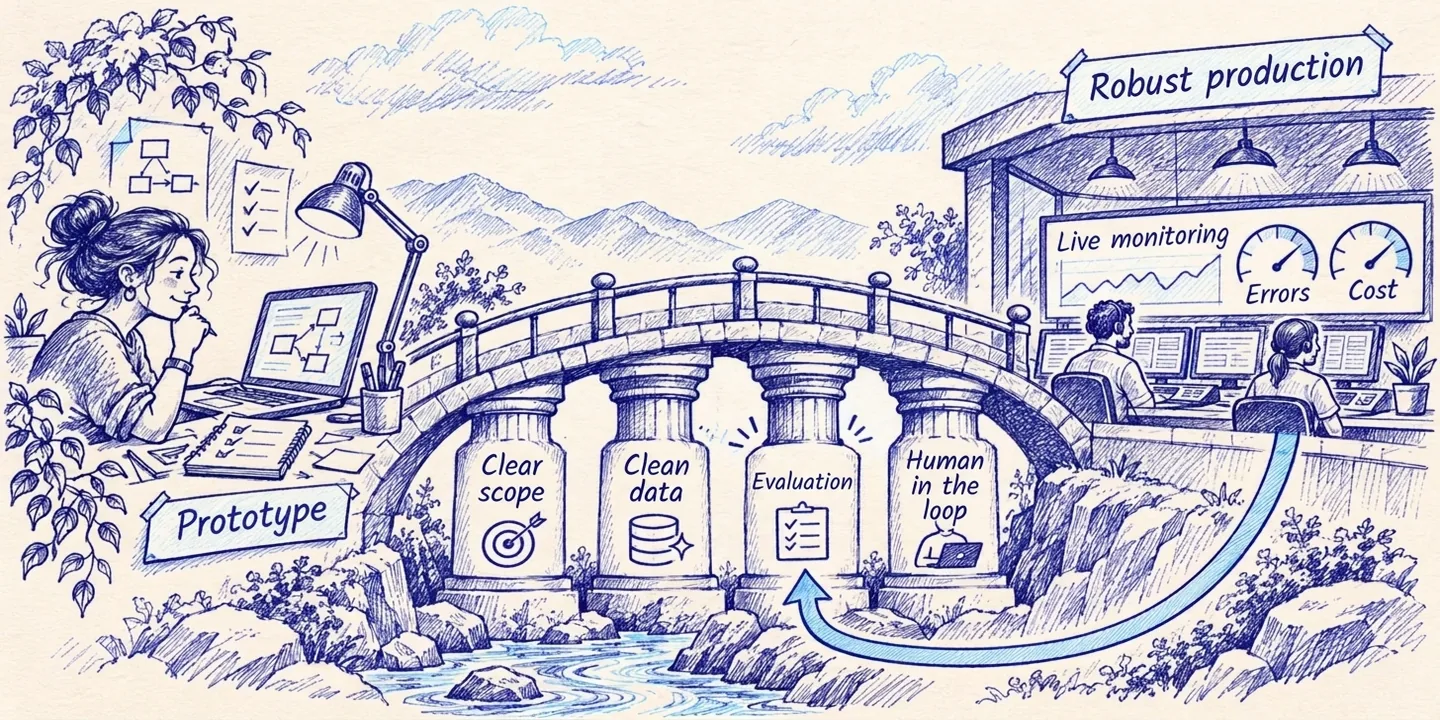
Everyone has seen a five-minute agent demo in 2026. An engineer pastes a prompt into a chat window, the agent queries a staging database, drafts an email, updates a ticket, and everyone in the meeting nods. Three months later, that same agent is either turned off or demoted to an internal toy that two people use once a week. Across industry surveys this year, organizational AI adoption sits near 88%, yet only about 31% of companies run an autonomous or semi-autonomous AI agent in production where real customers, real money, or real SLAs are on the line. Nearly seven out of ten agent prototypes die in the gap between the boardroom demo and the first month of production traffic.
They do not die because the language model is too weak. They die because a demo optimizes for the best possible run on five hand-picked inputs, whereas production optimizes for the worst possible run on five thousand messy, adversarial, incomplete inputs. Taking an agent from demo to production is a systems engineering and product ownership problem: bounding the job, separating deterministic code from model judgment, wiring narrow tools over MCP, installing hard runtime brakes, gating releases on automated evaluations, and measuring cost per completed task instead of cost per million tokens.
Key takeaways
- The 2026 production gap is architectural, not model-bound: 88% of organizations use AI, but fewer than one in three run agents in production because prototypes lack deterministic boundaries, evaluation suites, and named operational ownership.
- Generalist agents stall; task-specific agents ship: Agents that try to “run customer operations” fail on edge cases. Agents scoped to one verifiable workflow (“triage inbound invoice discrepancies under €500”) reach production in weeks.
- Follow the 6-step launch sequence: 1. Pick the job → 2. Shape the agent → 3. Wire narrow tools & memory → 4. Add the brakes → 5. Test as a release gate → 6. Watch cost per completed task.
- Measure cost per completed task, not token price: Retries, multi-turn context growth, tool payloads, and human verification time dominate your real P&L.
- Assign explicit failure ownership before launch: An agent is not a legal person. The Product Owner owns the business rules and escalation thresholds; the Tech Lead owns the harness, permissions, and kill switch.
Why 7 out of 10 AI agents die after the demo
When I audit stalled AI pilots for B2B and eCommerce teams, the post-mortem almost always reveals the same seven failure modes. None of them show up during a live demonstration, and all of them show up within the first seventy-two hours of real traffic.
| Failure mode | What happens in the demo | What happens in production | Root cause |
|---|---|---|---|
| 1. Unbounded scope | The presenter asks 3 clean questions that match the prompt examples. | Users ask ambiguous, multi-intent questions or upload scanned PDFs with missing pages. | The agent was given a role (“Support Agent”) instead of a single verifiable job. |
| 2. Silent hallucination on missing data | All required records exist in the seeded demo database. | An API times out or returns zero rows; the model invents a plausible order status to be helpful. | No deterministic rule forcing an abstain/escalate path on empty tool results. |
| 3. Runaway retry loops | Tool calls succeed on the first attempt in 200 ms. | A downstream ERP rejects a malformed payload; the agent retries 25 times in a loop and burns €14 in tokens on one ticket. | Missing step budgets, token caps, and idempotency keys in the agent harness. |
| 4. Context window poisoning | Conversation history starts fresh and stays under 4,000 tokens. | By turn 8, raw JSON dumps from 12 tool calls fill 90,000 tokens; attention degrades and the agent forgets system rules. | Routing raw database payloads through the model instead of filtering in code. |
| 5. Over-privileged tools | The demo uses a single admin API key so nothing gets blocked. | Security review blocks deployment because a prompt injection could read or modify any customer’s record. | Lack of per-request tenant scoping, read/write separation, and approval gates. |
| 6. No evaluation gate | “It looks good to me” after 10 manual chats. | Fixing one prompt regression breaks three other categories of requests without anyone noticing for two weeks. | No golden test set run automatically in CI before prompt or model changes ship. |
| 7. Orphaned accountability | The engineering team builds the demo; business stakeholders cheer. | The agent issues an unauthorized discount on a Friday evening; nobody knows who is on call to halt it and revert the state. | No named operational owner, no runbook, and no one-click kill switch. |
Notice how little any of these failures have to do with whether you picked Claude, GPT, or an open-weight model on your own server. Swapping the model inside a broken harness just changes the phrasing of the mistakes.
The five 2026 trends reshaping production agents
Teams that successfully cross the 31% production threshold in 2026 share five architectural shifts compared to the early experiments of 2024 and 2025:
- From open-ended pilots to measured business outcomes: Projects no longer start with “let’s see what an agent can do with our wiki.” They start with a baseline metric—current handling time, error rate, and cost per case—and a 30-day pilot threshold. If the agent does not beat the threshold on real traffic, it does not ship.
- Task-specific specialists over monolithic “super-agents”: Instead of one agent with forty tools, production systems decompose work into narrow specialists (for example, an extraction step, a policy-check agent with three read-only tools, and a deterministic execution script).
- Bounded multi-agent orchestration: Where a workflow spans multiple domains, a lightweight router or supervisor coordinates narrow workers with strict handoff schemas rather than letting agents chat freely with one another in natural language.
- Standardized plumbing via MCP and A2A: Internal tools and data sources are exposed through the Model Context Protocol (MCP), while cross-system or cross-vendor agent delegation increasingly uses Agent2Agent (A2A) task contracts. Standard protocols mean you write tool wrappers once instead of rewriting glue code for every model update.
- Agents embedded invisibly inside existing software: The chat box is rarely the best interface. The highest-ROI agents in 2026 live inside the ERP, the CRM, the pull-request pipeline, or the back-office queue—triggered by a webhook, doing the preparation work in the background, and presenting a one-click approval card to a human operator.
The 6-step launch sequence: from idea to production
When I take an agentic workflow from a client brief to production, I use a strict six-step sequence: pick the job, shape the agent, wire the tools and memory, add the brakes, test as a release gate, and watch the economics. Skipping a step does not save time; it just moves the failure from staging to your customers.
Step 1: Pick the job (and strip out what should be plain code)
The fastest way to make an agent reliable is to remove 60% of its responsibilities and hand them back to deterministic code. Before writing a system prompt, map the workflow step by step and classify every step into one of three buckets:
- Deterministic code (
if/else, SQL, regex, schema validation): Fetching the customer record by ID, checking whether an invoice is past due, validating an IBAN, calculating VAT, or writing to an audit table. Never ask an LLM to do arithmetic or enforce a hard database constraint. - Model judgment (extraction, classification, synthesis, planning): Reading an unstructured email in Romanian or English, matching a messy PDF line item to a catalog SKU, summarizing three support threads, or choosing which diagnostic tool to run next when an alert fires.
- Human decision (exceptions, high-value approvals, relationship judgment): Approving a credit note above €250, overriding a contract clause, or handling an angry enterprise account.
A production “agent” is usually 75% deterministic workflow code, 20% bounded model loop, and 5% human approval UI. If you can write the job in one sentence with a clear input, a clear output schema, and a clear definition of “done,” you are ready for Step 2. If you want to check whether your own process is ready for this split, run it through the AI Readiness Scorecard.
Step 2: Shape the agent (state machine, not a free-form chat)
In a demo, the agent loop is often a bare while loop that lets the model call any tool in any order until it decides to stop. In production, you shape the agent around an explicit state contract:
- Structured input and output schemas: The agent receives a typed context object (for example,
ticket_id,customer_tier,allowed_actions) and must finish by calling a terminal tool or emitting a strict JSON schema (status: "resolved" | "needs_approval" | "escalate_human",reason,proposed_action,citations). - Explicit uncertainty path: Every production agent needs a first-class way to say “I do not have enough verified data to complete this task” without feeling pressured by its prompt to guess. In practice, adding an explicit
escalate_to_human(reason, missing_fields)tool drops hallucinated actions dramatically because the model has a valid, rewarded exit ramp. - Model tiering inside the loop: Not every turn requires your largest frontier model. Use a fast, low-latency model for initial classification or routing, and reserve a reasoning-heavy model (such as Claude Sonnet/Opus or GPT-5 class models) for the multi-step tool planning turn.
Step 3: Wire narrow tools via MCP and keep memory clean
An agent is only as safe as the tools you hand it. When exposing internal APIs through an MCP server, follow four engineering rules that I cover in detail in Agent-Ready APIs and MCP Tool Calls vs. Code Execution:
- Task-shaped, narrow tools: Do not expose
execute_sql(query)or a genericupdate_order(order_id, json_patch). Exposeissue_duplicate_charge_refund(order_id, duplicate_transaction_id)where the server itself verifies that the two transactions are actually duplicates before touching Stripe. - Scoped credentials injected outside the model: The model never sees API keys, session tokens, or tenant IDs in its prompt arguments. The MCP host injects the authenticated user’s
tenant_idand role permissions at the transport layer. - Bounded, compact tool responses: Never return a 400-line raw database dump to the agent context. Return only the five fields the agent needs to make its next decision, plus pagination or a summary count.
- Tiered memory instead of infinite chat logs: Separate working memory (the current task state, cleared when the job finishes), episodic logs (immutable audit trails stored in PostgreSQL/ClickHouse for humans and evaluators, not stuffed into every prompt), and retrieved knowledge (versioned policy chunks fetched via private RAG with role-based access control and mandatory source citations).
Step 4: Add the brakes (guardrails, budgets, and human-in-the-loop)
Before an agent ever touches a live credential, wrap its execution harness in hard runtime brakes enforced in code—never in the system prompt alone:
// Production agent harness configuration: hard limits enforced outside the LLM
export const refundAgentPolicy = {
  task: "duplicate_payment_refund",
  budgets: {
    maxSteps: 6,
    maxToolCallsPerTool: { get_order_payments: 2, prepare_refund: 1 },
    maxInputTokens: 32_000,
    maxWallClockMs: 18_000,
    maxCostEurPerRun: 0.12,
  },
  permissions: {
    readTools: ["get_order_payments", "get_refund_policy"],
    writeTools: ["prepare_refund", "escalate_to_human"],
    autoExecuteMaxEur: 75, // Above €75 requires a 1-click human approval card
    requireIdempotencyKey: true,
    dryRunInShadowMode: false,
  },
  killSwitchEnvVar: "AGENT_REFUND_ENABLED",
};
Look at what that 20-line policy prevents:
- If a downstream API misbehaves,
maxToolCallsPerToolstops the retry loop on attempt 2. - If a prompt injection tries to keep the agent talking or exfiltrating records,
maxSteps: 6andmaxCostEurPerRun: 0.12terminate the run and trigger an alert. - Any refund above
€75automatically pauses the workflow at Level 2 autonomy (prepare and wait for human approval), while routine duplicate charges under€75execute at Level 3 autonomy with an idempotency key. For the full five-level autonomy ladder, see Autonomous AI agents: how much freedom to give them.
Step 5: Test as a release gate (evaluation before deployment)
In traditional software, you do not deploy to production because a developer clicked around on localhost for three minutes. You run a test suite in CI. An agent needs the exact same release gate, built from real historical cases before you launch.
A production evaluation gate tests four dimensions on a golden dataset of 100 to 200 cases:
- Trajectory accuracy (did it call the right tools with the right arguments?): On case #42, did the agent check the payment log before calling
prepare_refund? - Abstention and escalation accuracy (did it stop when data was missing or conflicting?): At least 25% of your golden set should be “trap” cases—ambiguous requests, missing invoices, expired return windows, and prompt-injection attempts—where the only passing grade is calling
escalate_to_human. - Policy and citation fidelity: Every factual claim or customer-facing message must cite a retrieved policy chunk ID that the server verifies in code.
- Latency and cost regression: If a prompt edit raises accuracy by 1% but doubles the average number of turns and pushes cost per task from €0.04 to €0.19, the CI check flags the regression before merge.
Step 6: Watch cost per completed task, not cost per token
Founders often look at an API pricing page, see “$1 to $3 per million input tokens,” and assume an agent run costs a fraction of a cent. Then the first monthly bill arrives.
In an agent loop, the conversation history grows with every tool call, and the entire accumulated history is re-sent to the model on every turn. If an agent takes 6 turns, retries a failed tool call twice, and pulls 15,000 tokens of JSON into its context on turn 2, a single task can consume 90,000 billed input tokens. Worse, if the agent fails on 30% of runs and a human still has to redo those tasks from scratch, your effective cost must divide the total AI spend across only the successfully completed tasks.
Here is an illustrative calculation for a B2B back-office agent handling 10,000 order-exception cases per month:
| Metric | Naive prototype (no brakes, raw JSON in context) | Engineered production agent (narrow MCP tools, step caps, caching) |
|---|---|---|
| Average model turns per case | 7.5 turns (including loops & retries) | 2.8 turns |
| Average billed input tokens per case | 82,000 tokens | 9,500 tokens (with 65% prompt cache hit) |
| Model & tool compute cost per attempt | €0.18 | €0.019 |
| Task completion rate (without human redo) | 58% | 89% (11% cleanly escalated on turn 1) |
| Human review / exception time per case | 6.5 min (fixing bad agent actions) | 1.1 min (1-click approvals + 11% escalations) |
| Effective AI + labor cost per completed case | €2.45 / case | €0.42 / case |
| Monthly total for 10,000 cases | €24,500 / month | €4,200 / month |
The engineered agent is not six times cheaper because it uses a cheaper model; it is six times cheaper because its tool schemas are compact, its system prefix is cacheable, its step budget cuts off loops early, and its clean escalation path stops it from creating mess that humans have to untangle. For a deeper breakdown of AI project budgets, see How much AI automation costs.
Who owns the agent when it fails?
This is the management question that stalls enterprise sign-off more than any technical hurdle: when an autonomous agent makes a bad decision at 11:00 PM, whose fault is it—the developer, the Product Owner, the model vendor, or the agent?
Never “the agent,” and almost never the model vendor. In front of customers, regulators, and your own P&L, the company deploying the agent owns every action it takes. Inside your organization, healthy teams split accountability across two named human roles before the pilot starts:
- The Product Owner / Process Owner owns the decision boundaries: Which case types the agent is allowed to touch, the euro thresholds on approval gates, the golden evaluation dataset (what counts as a right answer vs. an unacceptable error), and the weekly review of sampled production logs.
- The Tech Lead / Solution Architect owns the runtime harness and safety brakes: Enforcing least-privilege credentials in code, step and spend budgets, idempotency, observability traces, schema validation, and the instant kill switch that falls back cleanly to the manual queue.
If a failure happens because the agent called an unapproved endpoint or looped 50 times, that is an engineering bug in the harness. If a failure happens because the agent followed an ambiguous refund policy on a case type nobody had written rules for, that is a product specification gap—and that exact case gets added to the golden evaluation set the same day so the agent never repeats it.
How to scope a 30-day production agent pilot
To avoid the “endless pilot” trap, every agent project I run follows a fixed four-week cadence with an explicit go/no-go gate at the end:
- Week 1 — Job definition & golden set: Pick one high-volume, low-blast-radius workflow. Collect 100 real historical cases (including 25 messy exceptions) and measure the human baseline (time per case, error rate, cost).
- Week 2 — Harness, MCP tools & shadow mode: Build the deterministic workflow shell, expose 2 to 4 narrow read/write tools via MCP, and run the agent in shadow mode on live incoming cases without executing external side effects.
- Week 3 — Evaluation gate & Level 2 assisted launch: Compare shadow-mode outputs against human actions, tighten rules until the golden set passes >= 90% trajectory and abstention accuracy, and enable one-click human approval cards for the team.
- Week 4 — Narrow Level 3 autonomy & economic review: Turn on automatic execution only for the highest-confidence, lowest-risk case slice under a strict euro cap. Measure cost per completed task and hours saved, then decide whether to expand to the next case slice or stop.
What to bring to a first conversation
If you have an agent prototype that worked in a demo and stalled before production—or a repetitive back-office, support, or engineering workflow you want to automate without gambling your customer trust—bring three things to our first call:
- One specific job your team repeats at least dozens of times a week, from trigger to final outcome.
- Ten real examples (anonymized), including three annoying edge cases where the usual rules break.
- The blast radius of a mistake: Which actions are reversible in one click, and which ones must always wait for a human signature.
We will map what belongs in deterministic code, what belongs in the agent loop, what brakes and evaluation gates it needs, and what the cost per completed task will look like before writing production code.