What AI agents are, and when you actually need one
An AI agent is a model that chooses its own next step, uses tools and works in a loop until a goal is met. How it differs from a chatbot and a workflow, what it is made of, and when it is worth the extra cost.
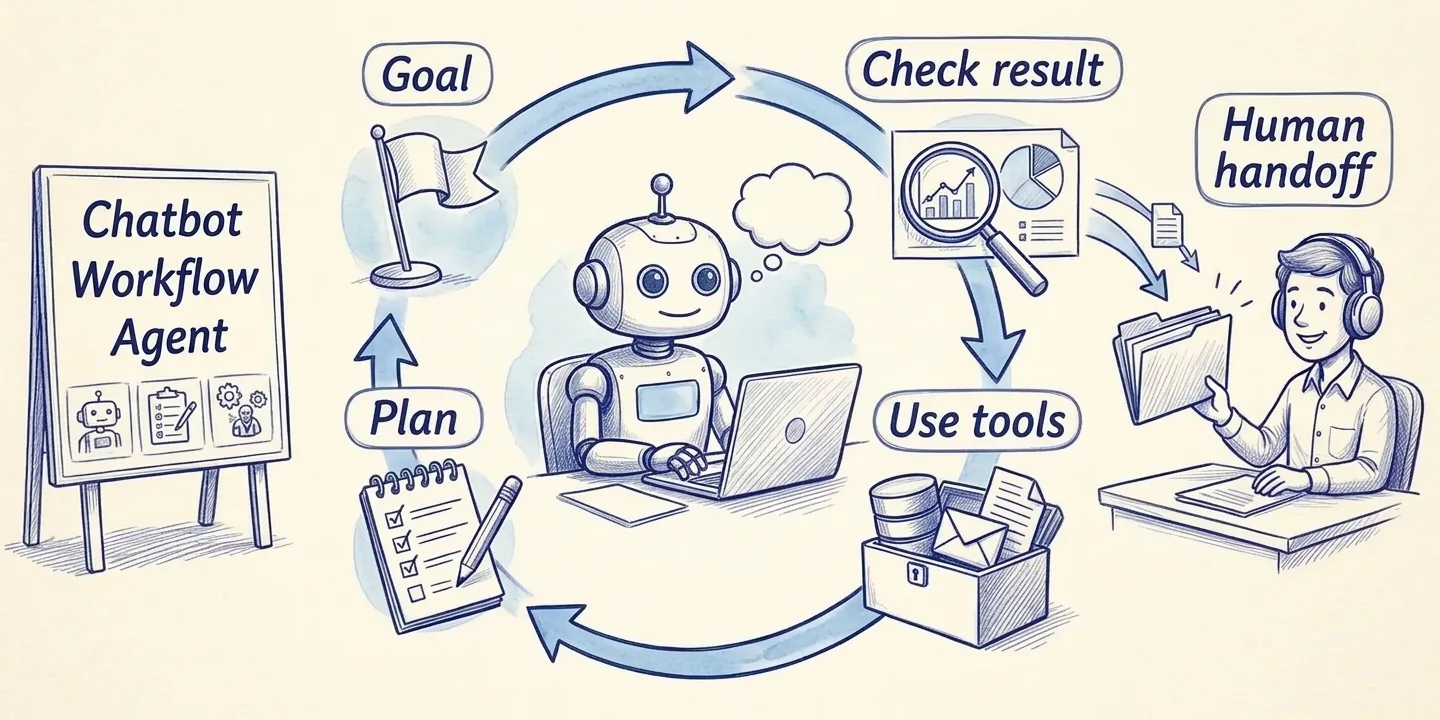
An AI agent is a language model that decides its own next step. You give it a goal, a set of tools and some rules. It picks an action, looks at the result, and decides what to do next, again and again, until the goal is met or it stops and asks a person. That loop is the whole difference between an agent and the AI features most companies already use.
The word gets stretched a lot. Vendors call a chatbot with a nicer prompt an “agent”, and a fixed automation with one model call an “agentic workflow”. This article draws the lines clearly, shows what an agent is made of, and gives you a simple test for when an agent is worth its extra cost and risk.
Chatbot, workflow or agent?
The useful question is not how smart the model is, but who decides the path.
| Chatbot | AI workflow | AI agent | |
|---|---|---|---|
| Who decides the steps | The user, one message at a time | Your code, in a fixed order | The model, step by step |
| Tools | Usually none, or one lookup | Called by your code | Chosen and called by the model |
| Typical task | Answer a question | Classify a ticket, extract fields, summarise | Investigate a problem, complete a multi-step task |
| Predictability | High | High | Lower, needs guardrails |
| Cost per task | Low | Low to medium | Medium to high, varies per run |
A chatbot answers. A workflow runs a path you designed, with the model doing one or two jobs inside it, such as “read this email and return the order number”. An agent gets a goal (“find out why this customer was charged twice and fix it if the rules allow”) and works out the path itself: look up the customer, read the invoices, check the payment provider, compare, then either refund or escalate.
Most business value today still comes from workflows. Anthropic’s own guidance on building agents makes the same point: start with the simplest pattern that works and add autonomy only when the task needs it.
What an agent is made of
Every agent, whether bought or built, has the same parts.
- A model that can reason about the next step and call tools reliably.
- Instructions: the goal, the rules, what “done” means and when to stop.
- Tools: functions the agent can call, such as searching a database, reading a file, sending an email or calling an API. Each tool has a clear name, a description and a schema for its inputs.
- The loop: the code that sends the model the current state, runs the tool it asks for, returns the result, and repeats.
- Memory and context: what the agent knows about the task so far. Short tasks keep everything in the conversation; long ones need notes, summaries or a file the agent can write to.
- Guardrails: limits on what each tool may do, approval steps for risky actions, budgets for time and cost, and a way out to a person.
If one of these parts is missing, you usually do not have an agent. A model without tools can only talk. Tools without a loop are a workflow. A loop without guardrails is a liability.
How the loop works in practice
Take the double-charge example. The agent receives the goal and the customer ID. It might:
- Call
get_customerto read the account. - Call
list_invoicesfor the last 60 days. - Notice two payments with the same amount on the same day, and call
get_paymenton both. - See that one payment was retried by the provider after a timeout.
- Check the refund policy in its instructions: duplicates under a set amount can be refunded automatically.
- Call
create_refund, or, above the limit, write a summary and hand the case to a person.
None of these steps was written in advance. That is the power and the risk. The same agent, given a slightly different case, may take a different path. Your job is to make sure every possible path stays inside the rules.
When an agent is worth it
Agents cost more than workflows: more model calls per task, more variable timing, and more testing. Before you build one, check four things.
- Is the task hard to specify in advance? If you can draw the flowchart, build the workflow instead.
- Is the outcome valuable enough? An agent that saves a specialist an hour on a complex case is worth more than one that saves ten seconds on a simple one.
- Can the model actually do it? Test on real, messy examples before you commit.
- Can mistakes be caught and undone? Refunds under a limit, drafts a person reviews and code that runs through tests are safe places to start. Payments without limits and messages sent straight to customers are not.
If any answer is “no”, stay with a workflow or a single model call. You can move to an agent later, once you know where the variability really is.
Where agents work well today
- Software development. Coding agents read a codebase, make changes, run the tests and fix what fails. This is the most mature use, because tests give the agent fast, objective feedback.
- Support and operations. An agent that can look up orders, check statuses and follow a refund policy handles the long tail of cases a script cannot.
- Research and analysis. Reading many documents, comparing sources and producing a summary with references.
- Internal tools. Connecting systems that were never integrated: “pull last month’s invoices from the ERP, match them against the bank export and list the differences”.
In all of these, the agent works best when results can be checked: tests pass, totals match, a person approves the draft.
The risks to plan for
- Wrong actions. An agent can misread a situation and take a confident wrong step. Limit what each tool can do, and require approval for actions you cannot undo.
- Prompt injection. Text inside an email, a web page or a document can try to give the agent new instructions. Treat everything the agent reads as data, never as orders, and keep permissions narrow. See AI system security: prompt injection and permissions.
- Runaway cost. A loop that never converges keeps calling the model. Set limits on steps, time and spend.
- Hard-to-explain results. Log every step, every tool call and every result, so you can see why the agent did what it did.
Common mistakes with a first agent
Too many tools at once. An agent with thirty tools spends its effort choosing between them and picks the wrong one more often. Start with three to five tools that cover the core of the task, each with a precise description of when to use it and when not to.
Vague instructions about “done”. If the instructions do not say what a finished task looks like, the agent either stops too early or keeps going. Write it down: “done means the refund is created or the case is handed over with a summary of the evidence”.
No examples of the hard cases. Agents are usually tested on clean examples that any approach would handle. Collect the awkward ones: incomplete data, two records that look like duplicates but are not, a customer who changes their mind halfway. Those decide whether the agent is useful.
Treating the first version as final. The first weeks of logs show where the agent hesitates, which tool descriptions confuse it and which cases need a new rule. Plan time for that tuning; it is where most of the quality comes from.
Skipping the manual fallback. When the agent is unsure, or when it is switched off, someone must be able to finish the task. Keep the manual path documented and working.
Frequently asked questions
Is ChatGPT or Claude an agent?
The chat apps are assistants that can act like agents when they use tools, such as searching the web, running code or controlling a browser. An agent in your business is usually something you configure or build on top of a model, with your own tools, rules and data.
Do I need a developer to build an agent?
For simple internal agents, no-code platforms can be enough. As soon as the agent touches customer data, payments or production systems, you need someone who designs the tools, the permissions and the tests properly.
Will an agent replace a team member?
Today, agents mostly take over repetitive investigation and preparation work, and a person decides on the exceptions. That changes how a team spends its time more than how big it is.
How do I measure whether an agent works?
Use a set of real past cases with known correct outcomes. Run the agent on them, check the results, and track the rate of correct completions, the cost per completed case and how often it hands over to a person.
What to bring to a first conversation
Bring one task you would like an agent to handle, three or four real examples of it (including a messy one), the systems it would need to touch, and what should never happen without a person’s approval. That is enough to decide whether you need an agent, a workflow or simply a better form. For how agents fit into a customer-facing assistant, see AI bot architecture: from scripted chatbot to agent.