How AI can improve everyday life without hype or fear
Concrete uses of AI in work, learning, administration and leisure, plus the limits you should know: verification, privacy and dependency. Simple habits, applicable from day one.
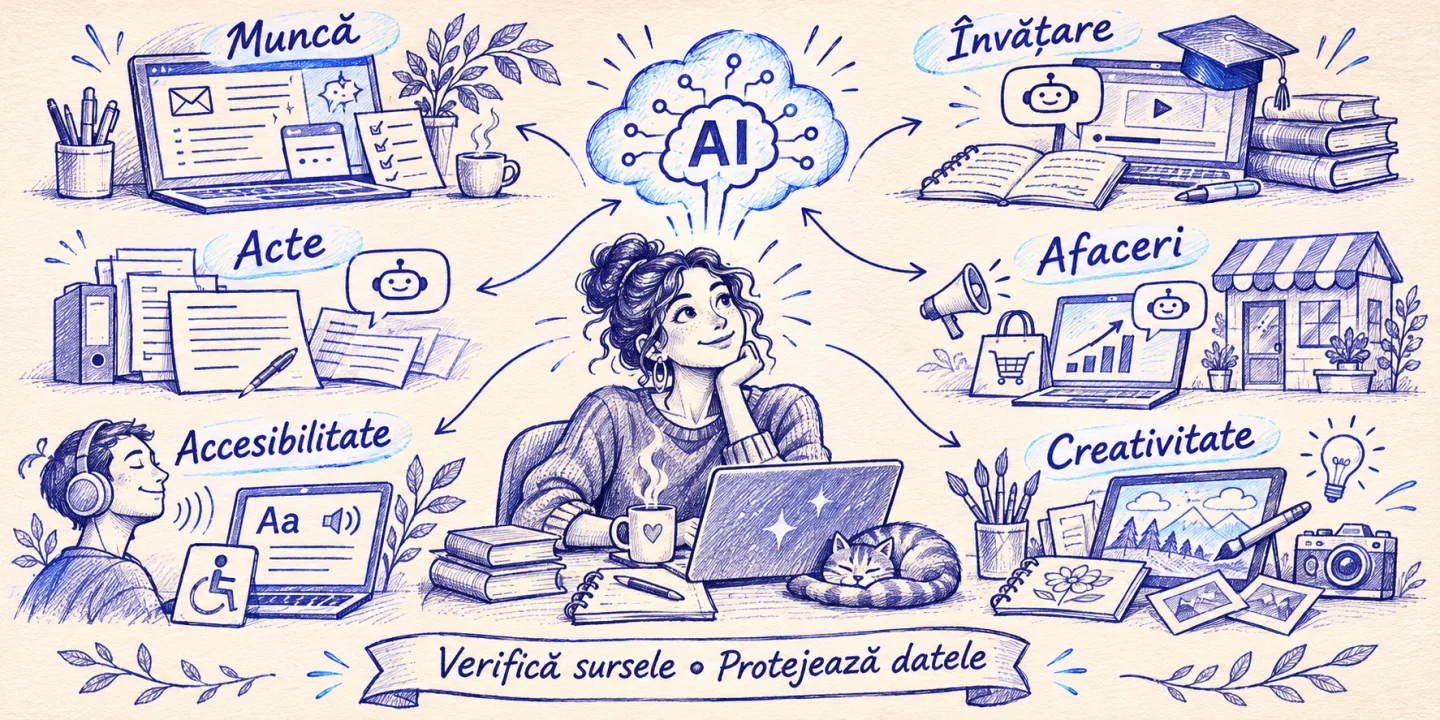
AI is being talked about as either a miracle or a threat. I work with it on projects and in my day-to-day work, and I have a less dramatic opinion: it’s a very good tool for some things, mediocre for others, and dangerous when you don’t check it. This article is about the useful part: how AI can actually make your day easier, what habits are worth forming, and where you need to be careful.
In short
- AI excels at language and organization tasks: summarizing, drafting, structuring, explaining, translating, sorting.
- The biggest gain comes from the small and repetitive things, not from spectacular projects.
- Treat the output as a draft from a hurried colleague: useful, but to be checked, especially on figures, data and sources.
- Do not give information in the chat that you would not give to a stranger: passwords, medical data, confidential contracts.
- Used wisely, the AI gives you back time. Used on autopilot, it steals your skills.
Where it helps the most: the small, repeated things
When I say “AI”, many think of big things: self-driving cars, robots, sci-fi movies. Real earnings, at the level of a typical day, are much more prosaic. It’s the hour wasted on a difficult email, the half hour spent reading a forty-page report to learn two conclusions, the morning you don’t know where to start.
Here are the categories in which I use it and recommend it:
Writing and communication. A delicate email (a complaint, a polite refusal, a negotiation) becomes easier when you have a first draft that you adjust. You don’t send it unmodified, but going from something written beats the blank page. The same for messages to customers, product descriptions or posts.
Quick reading. Summarizing a long document, extracting decisions from a meeting transcript, comparing two offers. The AI quickly shows you what it’s about, and you decide what’s worth reading in full.
Organize. From chaotic notes, a prioritized task list. From a vague topic, a plan in steps. From a busy calendar, a proposal for the order of the day.
Translations and language. Quick translations and more importantly explanations: why it’s said like that, what tone is appropriate, how it sounds naturally. Useful for anyone working with partners in other countries.
Ideas and Alternatives. When you’re stuck, ask for ten different headlines, five approaches to a problem, arguments against your own idea. You won’t use it all, but you’ll get out of the jam.
Notice what they have in common: they are all tasks where the result can be checked by you quickly and where a small mistake does not spell disaster.
Learning: a patient tutor, at all hours
One of the best uses, in my opinion, is learning. A linguistic model can explain the same concept in three ways until you understand it: as for a child, as for a colleague, as for a specialist. He can give examples, test you and correct a solution by explaining where you went wrong.
Some methods that work:
- Have him quiz you. “Test me on the basic accounting chapter with five questions one at a time.” Active learning remembers better than passive reading.
- You explain. Tell him what you understand and ask him to find what is missing. If you can explain, you got it.
- Ask for sources. For important topics, ask for books or articles to check, then actually check them. Models can make up references that sound believable.
- Build a plan. “I want to learn the basics of SQL in four weeks, 30 minutes a day.” You get a route that you can adjust.
There is also a trap here: if you ask him directly for the solution to each exercise, you learn nothing. The difference between a tutor and a shortcut is if it makes you think.
Administration and money: less red tape
The boring part of adult life (documents, invoices, forms) is good ground for automation, on one condition: you check what comes out.
- You can ask for a simple explanation of a legal text or a clause in a contract, so you know what questions to ask the specialist. It’s not a substitute for a lawyer or an accountant, but it does prepare you for the discussion.
- You can sort and categorize expenses, extract data from invoices or prepare a table from a set of messages.
- You can prepare a draft letter to an institution with the right structure and tone.
With numbers, the rule is firm: the AI can make mistakes in calculations and “invent” amounts. For anything that matters financially, redo the calculation in a table or with a calculator. I ask him to show me the steps so I can check the logic, not just the result.
In small business: an extra colleague
For an entrepreneur or a small team, AI can be a collaborator who works at all hours: prepare offers from briefs, answer frequently asked questions of customers, sort incoming requests, summarize meetings. The best effect occurs where a repetitive process takes a lot of time, and the result can be quickly checked by a human.
What doesn’t make sense: to automate a chaotic process. AI does not bring order to a fuzzy activity, it amplifies it. If you want to see how such a project is chosen and calculated, I explained in AI Systems in Production the steps through which a process goes from an idea to a reliable system.
Accessibility: Real help for many people
A less talked about but very valuable area is accessibility. Automatic speech transcription helps the hearing impaired. Automatic image descriptions help the visually impaired. Summarizing and simplifying texts helps people with dyslexia or those reading in a new language. Dictation replaces the keyboard for those who cannot comfortably use it.
They are not perfect solutions, but they make information accessible to people who were previously excluded or dependent on others. This is where technology truly deserves its place.
Free time and creativity
AI is not just about work. It can suggest a menu for a week from what you have in the fridge, a weekend route adapted to the budget and time, a reading list starting from the books you liked or a training plan that you adjust with the doctor or trainer. In creation, it is a discussion partner: it gives you story variants for children, rhymes for a wish, decoration ideas.
The healthiest attitude is to use him as a starting point, not as an author. The result becomes yours only after you rewrite it, choose it and put something personal in it. A gift or card written entirely by a model usually feels like it comes from nowhere.
Where you need to be careful
An honest article about AI cannot skip the risks. The ones I consider essential:
1. Hallucinations. Models can produce self-confident and wrong answers: made-up data, non-existent quotes, non-existent laws. The more persuasive the tone, the more important the verification. My rule: the higher the stake, the more I check.
2. Privacy. What you write in an online service may be stored and, under some conditions, used for training. Read the privacy settings. Do not enter passwords, card details, medical information or confidential documents of others in public services. For sensitive data there are privately hosted options.
3. Health and medical or legal decisions. You can get general information, but you are not a substitute for your doctor or lawyer. For symptoms, medications, or litigation, AI can help you prepare your questions, not make the decision.
4. Biases. Models learn from human-written texts and inherit their biases. Don’t let them decide things that affect people (employment, credit) on their own.
5. Addiction. If you delegate all the thinking, skills weaken. Writing, mental arithmetic, orientation, memory are lost when not practiced. Keep the tasks that develop you and delegate the ones that only tire you.
Simple habits to use it well
A set of personal rules, available to anyone:
- Give context. The clearer you are about who you are, what you want, and for whom, the better the answer. “Write an email” gives something generic. “Write a polite email, no more than five lines, to a customer who is a month late” yields something usable.
- Ask for options. The first form is rarely the best. Ask for three, pick and mix.
- Check what matters. Figures, dates, names, quotes, tips with stake.
- Ask him to show his reasoning and say what he doesn’t know.
- Keep the decision. You sign, you send, you answer.
- Protect data. Anonymize sensitive names and numbers before you paste them into a chat.
- Take breaks without him. Solve every now and then on your own to keep your mind engaged.
What a good day looks like with AI
In order not to remain abstract, here is a realistic example, without miracles. In the morning, you give him the notes from yesterday’s meeting and get the list of decisions and tasks. Before lunch, a difficult email goes faster and better worded. In the afternoon, a long report is summarized in ten lines, and you read in full only the chapter that matters. In the evening, you make a study plan for a course you’ve been putting off for months.
You haven’t done anything extraordinary, but you’ve recovered maybe an hour and a half and reduced mental fatigue. Collected over a month, they change the pace of work, without changing your place in decisions.
Conclusion
AI will not solve anyone’s life or destroy it. It’s a tool that, used with intention, takes some of the mechanical work out of your day and leaves you more room for what matters: relationships, decisions, creativity, rest. You don’t have to change everything at once, nor do you need to know the technology in detail. Start small: pick a repetitive task, try it for a week, check the results, and decide on data, not enthusiasm. If it works, expand. If not, you lost a little and learned a lot.