AI for APIs and workflows: where you save time and where latency adds up
How to reduce manual steps with AI without blocking the API: queues, latency budget, fallback response and indicators.
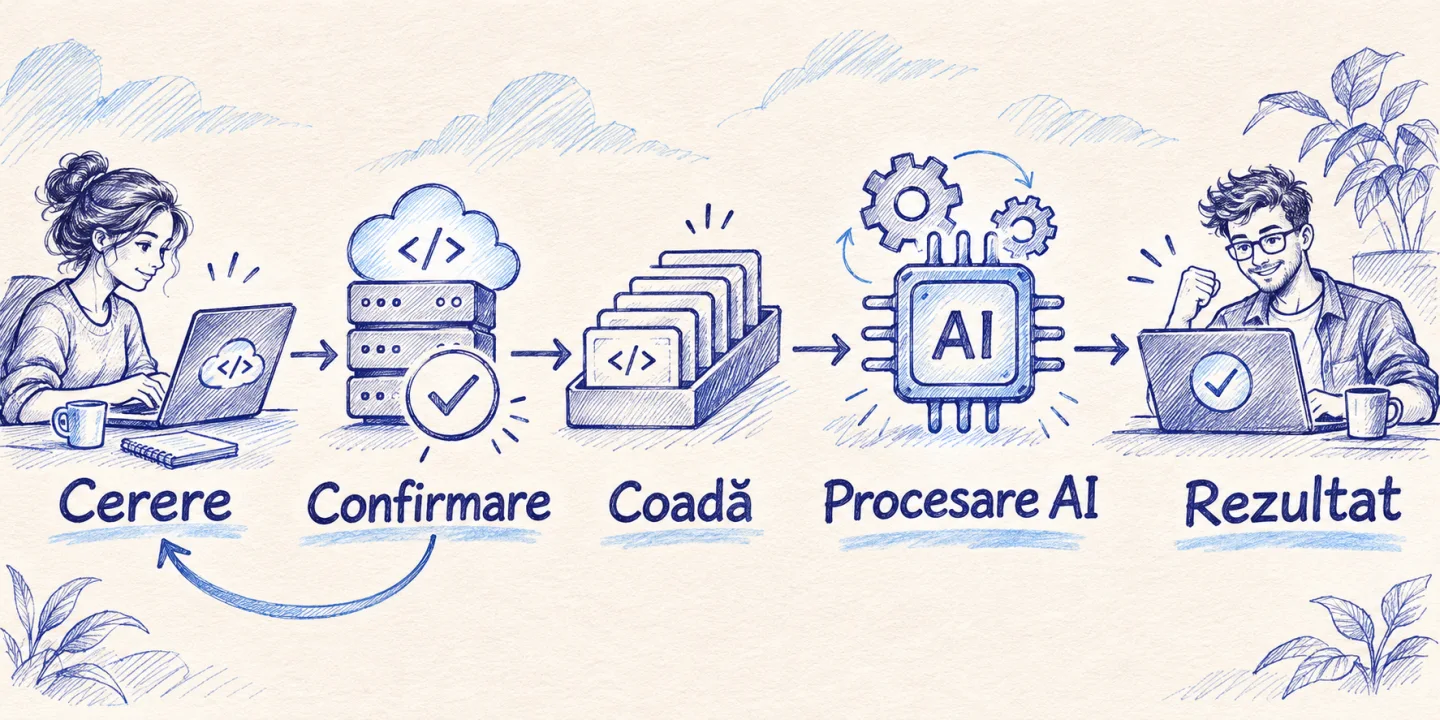
AI improves a workflow when it reduces the time to a usable result. A model can categorize messages, extract fields, or summarize documents, but it also introduces an additional call, variable times, and checks. The architecture keeps deterministic operations on the fast track and moves lengthy processing to the background when the user can continue without its result.
Imagine a portal that receives requests with attachments. Confirmation of receipt must be quick. Reading the appendix and preparing a handout for the sales team can take time. If the form waits for the model before confirming, a delay at the provider makes the whole portal look broken. If you save the request and process the ticket separately, the customer gets the confirmation and the team gets context when it’s available.
How do you measure the performance of the entire process?
It measures two hours. The first starts when the user submits the request and stops at confirmation. The second stops when the result is good for the next step. In the portal example, the first includes receiving and saving, and the second includes reading the attachment, validating and any corrections. An optimization can shorten one of these times and worsen the other. Decide what matters to each person and track both values.
Collect a cast, not just the media. p95 is the value to which about 95% of the observations fall, and p99 measures a point even closer to the slowest cases. Compares the same operation over similar periods and volumes. A jump can come from larger files, from the queue, or from the database. It records the size of inputs, queue time and external calls separately. Underload APIs Guide
Tracks the rate of correctly completed cases. A form can accept requests quickly even when a part hangs and they don’t get a response. Use alerts for out-of-date statuses and indicators for manually sent cases. Cost per completed case includes model consumption, observability and operator time. These values can change the order of variants from a call price comparison.
What operations do you keep in the code?
| Operation | Right place | What are you checking? |
|---|---|---|
| Confirmation of receipt | The service that saves the request | Time, errors and duplicates |
| Calculation of a price | Commercial service | Active rules and limits |
| Interpretation of a free message | Model followed by validation | Quality and escalating cases |
| Summary of annexes | Background processing | Waiting, corrections and cost |
| Confirmation of a change | The application that authorizes the operation | Repeated permissions and effects |
Pricing, field validation, and permissions depend on rules that the app can check. The model can identify informally mentioned products or suggest relevant sections in a document. The responsible service checks whether those products exist, what the person can see and whether the status allows the operation. The interface should show the difference between the proposal and the recorded result.
Choose the model only in cases where it changes something. If the form has already asked for the project type and reference number, a rule table can route the request. For free emails or attachments with different formats, a template can bring more value. Evaluate both paths on examples that include ambiguities, not just the cleanest entries.
How do you design background processing?
Register the durable request before you confirm. For a request accepted but not yet processed, the HTTP 202 response may indicate where to look for the status. In the product, it says if the request is registered, in progress, approved or waiting for information. These statuses must remain viewable after page refreshes. Semantics 202 Accepted in RFC 9110
It links the lifetime of the job to the status of the request. If saving and scheduling are separate, consider the case where the first succeeds and the second fails. It keeps a persistent track of the work required for a reconciliation process to recover the claim. A final state must be updated after the effects are confirmed, otherwise the operator sees a finished job with no result.
Think of retries at the business level. Reprocessing the same request must retrieve the same ticket or complete the incomplete result. It uses a stable identity for the operation and a write check. For two legitimate requests from the same customer, the difference between the requests must be preserved. If you deduce the identity only from the name of the person or from the minute of receipt, you risk missing different cases.
It also sets when the job expires. A report that appears after the operator has resolved the claim can be kept as additional information without rewriting the decision. Similarly, a customer who has canceled the request should not subsequently receive a confirmation produced by a late worker. Each component that generates effects must read the relevant state before proceeding.
How do you allocate a latency budget?
It starts with how the user feels. A simple navigation action must remain fluid, while an explicitly requested report can take time when it has visible progress and resume. It then divides the budget between storage, authentication, lookup, model and transfer. It sets a deadline when the product stops waiting for the model and explains what the user can get at that time.
Reduce input to information that can change the outcome. To extract the conditions of an offer, you can separate the attachments and search for relevant fragments. It then compares the results on requests that contain exceptions, because an important fragment may appear in a footnote. The exit limit matters just as much. A table of five values requires a different response than a full history summary.
A fast model can handle common cases, and atypical cases can reach further analysis. But check the routing cost. If you add a full call just to pick the next model, the result may be slower than before. Uses existing information, such as document type and size, when it identifies difficult situations well enough.
Reusing results requires rules for update and access. A public product description is different from a response based on the customer’s private history. For a generated response cache, it starts with the source identity, version, and permissions. If a person loses access to the document, also check what old versions or answers might still be served to them.
What happens when the supplier is late?
Make the bottom line available. The request can also be confirmed without a form. The operator can read the attachment and the customer can return to the status page. In the interface, “request saved” and “we are preparing a summary” are different information. If they are combined into a single spinning indicator, the user can submit the file again.
It tests for a call that exceeds the deadline, an output with no required fields, and a result that arrives late after human intervention. For all, check the original entry and already confirmed decision. If there is a manual route, it should pick up the filled fields. The test must be run from the surface the operator is using, as a matching error code does not guarantee a clear message.
It also adds visibility for the technical team. A request identifier allows correlation between application, queue and worker. Logs should show how long each step took and what state changed. Sensitive details are in the authorized system. For an alert, use the observable impact, such as requests older than the deadline, and link the alert to an action someone can take.
How do you demonstrate the profitability of an AI workflow?
It measures a typical period. Note how many cases are followed by clarifications, how long colleagues spend between applications, and where corrections occur. Automating summaries will not shorten the offer if the team is waiting for rate approval. In that case, it first investigates the approval rule and only then the value of the generated text.
For example, 300 files per month and four minutes saved in preparation equals 20 gross hours. If 60 requires three additional minutes of correction each, 17 hours remain before operation. If monitoring requires five more hours, the hypothetical net gain is 12 hours. It checks if the released hours can be used for another activity and if the benefit is maintained at another volume. These figures are illustrative assumptions, not estimates for a customer.
In the pilot, it separates simple, ambiguous and high-volume requests. An average result can hide the fact that the team benefits only for standard documents. In that case, launch for the useful segment and keep a report for the others. An explicit limit can also improve the experience of the customer, who immediately knows which documents can be processed automatically.
How do you make the load test relevant?
Model a plausible peak. It includes a mix of small and large files, short provider outages, and multiple operators opening the same list. If you only have average volumes, compare a typical interval with a build-up scenario. Use an approved environment and synthetic inputs to avoid exposing production data.
Track API time and job age separately. If the API stays fast but the queue keeps growing, the system is accepting more than it can complete. Adjust capacity or limits and decide whether users should see an estimated delay. Then test the return to a normal volume. A system can withstand the peak but take a long time to process the backlog.
Records application version, configuration and test data. When changing the model or an integration, you will have a reference for comparison. Also note what was not simulated, such as an external service limited to a lower volume. This information makes the result repeatable and reduces the risk of presenting a narrow measurement as a general promise.
How do you choose where to introduce AI observations first?
For the engineering team, AI can be used separately from customer traffic. For example, ask for a summary based on some redacted metrics or a list of assumptions for increasing queue time. Check assumptions in current tools and keep links to real graphs. A summary can speed up the orientation, but the decision to change limits or expand capacity must be based on confirmed indicators.
In operations, it shows the hint right in the worklist and lets the operator correct the category. If he opens the same request in another app in the meantime, check if you really removed a step. A test on a few requests may show that ordering fields or saving a search yields more value than generating the entire text. It starts with the function that eliminates the most frequent information transfer.
For customers, avoid faster promise than result. A completion notification is useful when the status is confirmed and can be consulted later. When the pilot updates an already visible result, it shows what has changed and who can correct it. This discipline protects both perceived performance and stream integrity.
What should the agreement between the teams contain?
Write in a document who receives the request, who processes the attachment, and who resolves the exceptions. It includes what “received” means to the customer and what “done” means to the operator. If the commercial team uses only validated results, their panel must distinguish an available draft from a completed sheet. Otherwise, the same indicator will mean different things in two sessions.
For each term, it specifies the measurement range and what happens when it is exceeded. A report can exclude canceled jobs and display them separately. A worker can resume an interrupted draw, while an operator can manually modify an urgent request. Determines which of the two actions takes precedence so that a delayed job does not change the already committed state. This agreement also helps with estimation because it shows what capacity needs to be planned at each stage.
Frequently asked questions
Does AI make the API faster?
It can shorten the entire workflow by reducing manual steps. The call to the model adds a dependency and usually time to the path it runs on. Measure to confirmation and correct resolution. For interactive apps, move what can wait to the background.
How do I choose between status check and notification?
In a simple interface, periodic status polling may be sufficient if the interval is reasonable. For an integration that needs to react promptly, use an authenticated notification and handle repeat deliveries. Maintain a reconciliation method for situations where the notification is lost.
What indicator is worth on the control panel?
For reception, track latency and errors. For processing, track old requests and completion rate. For business, track the time saved after corrections and the results delivered to the client. A good dashboard also shows who acts when value deteriorates.
Where do I start if performance is already poor?
Check the database, response volume, and dependencies before adding the model. Isolate existing delays and choose a point where the new stage brings measurable value. Keep a reproducible example for further testing.
What do you bring to the discussion of an integration?
Bring a representative request, list of systems, observed times, and a case that failed. Mark what data is being transformed, where an approval needs to be obtained, and what you can tell the customer when a component is not responding. You will be able to compare a simple rule, a deterministic integration and an AI step on the same scenario. For projects linking existing tools, see API and MCP integrations.